
Guide · 3 min read
Turn Photo to PDF: Pick the Fastest Method in 3 Questions
By the PNG to PDF team ·
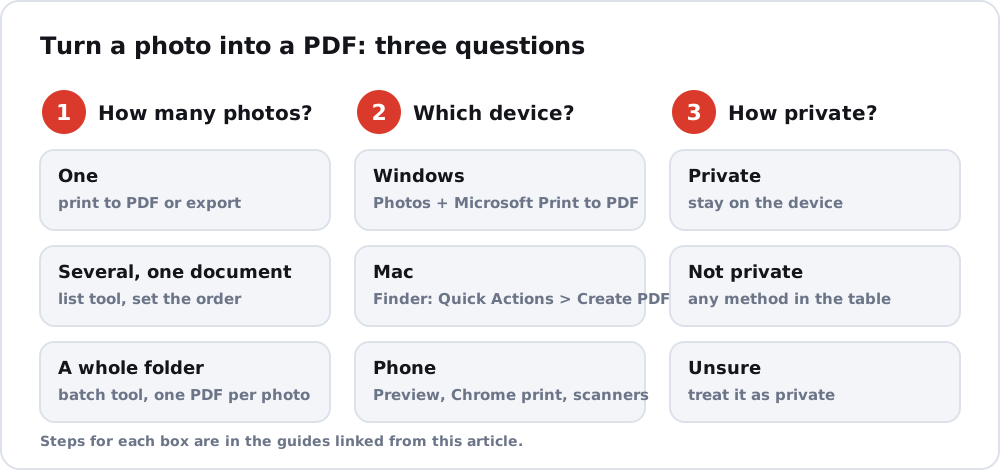
The fastest way to turn a photo to PDF depends on three things: how many photos you have, which device you are on and whether the photo is private. Answer them in that order and the method follows. This page is a decision guide; the steps live in the guides it points to.
Turn photo to PDF, question one: how many photos
One photo needs only a print-to-PDF feature or a Preview export, and the idea behind the print route is in save photo as PDF. Several photos that should become one document need a tool that takes a list and sets the page order; combine images into PDF covers that. A whole folder that should become separate files needs a batch tool, which is the topic of convert photos to PDF.
Question two: which device
| Device | One photo | Where the steps are |
|---|---|---|
| Windows | Photos app, Ctrl+P, Microsoft Print to PDF | JPG to PDF explains what the PDF will contain |
| Mac | Finder: Quick Actions > Create PDF, or Preview > Export | The Finder action lists pages in the order you selected the files, per Apple |
| iPhone | Preview: Actions Menu > Export | Photo to PDF free |
| Android | Chrome: Share > Print > Save as PDF | Photo to PDF free |
| Any computer with Chrome | An extension that accepts your format | See the note below |
For Chrome on a computer, the PNG to PDF extension accepts PNG, JPG and HEIC, and its maker says it processes files inside the extension on your computer. The site does not publish limits, so try one photo first.
Question three: how private is the photo
For a private photo, such as an identity document or a medical letter, prefer a tool that runs on your device: the built-in features above, or software you have verified. A website receives your file unless it says it works in your browser, and that statement is the site’s own claim. If the photo is a snapshot you would post anyway, any method in the table is fine.
Quick answer
One photo on any device: use the built-in feature in the table. Several photos on a computer: use a list-based tool and check the order. Private photo: stay on the device.
FAQ
What is the quickest way to turn a photo into a PDF?
The built-in print-to-PDF or export feature of your device, because it needs no download. Pick the row for your device in the table.
Can I turn several photos into one PDF?
Yes. Use a tool that takes a list of photos and sets the page order, and check the order afterwards.
Does turning a photo into a PDF reduce quality?
Not if the tool embeds the JPEG data as it is. Compare the PDF with the photo at 100% zoom.