
Guide · 3 min read
Photo to PDF: Orientation, Size and Resolution Tips
By the PNG to PDF team ·
Putting a photo into a PDF is easy; the problems come from how phone photos are built. A phone photo can store its rotation as a tag instead of turning the pixels, and it has far more pixels than a page needs. Check orientation and size on the first PDF, and the rest of the batch will go smoothly.
Photo to PDF and the orientation tag
A phone photo records which way the phone was held in an EXIF orientation tag, and viewers rotate the picture to match. MDN notes that browsers apply this rotation by default. A PDF tool may or may not. A test on 2026-10-24 used a 600 by 400 JPG with the orientation tag set to 6 (rotate 90 degrees). img2pdf 0.6.3 kept the pixels and set a 90 degree page rotation, so the page displayed upright. Pillow 13.0.0 ignored the tag and produced a page with no rotation, so the photo would appear sideways. Applying ImageOps.exif_transpose before saving gave a 400 by 600 pixel upright image.
from PIL import Image, ImageOps

img = ImageOps.exif_transpose(Image.open("photo.jpg")).convert("RGB")
img.save("photo.pdf", resolution=150.0)
If a photo comes out sideways, the tool ignored the tag; rotate the photo first or use a tool that honors it.
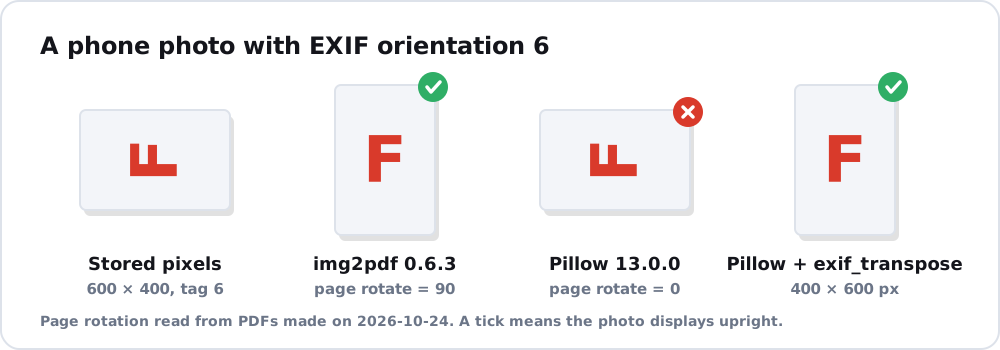
Photo to PDF and pixel count
A photo carries more pixels than a page can show sharply. The arithmetic: a photo 4000 pixels wide laid along the long edge of an A4 page (11.69 inches) has 4000 / 11.69, about 342 pixels per inch. The pixels needed for a full A4 page at 300 pixels per inch are 2480 by 3508. Pixels beyond that make the file larger without making the page look better. For printing, about 300 pixels per inch at printed size is common guidance, and for sharing on screen a lower figure is enough. Create PDF from images shows how to set page size in code.
Photo to PDF for HEIC and printed photos
iPhones save HEIC unless the camera is set to Most Compatible, and many tools reject HEIC; the routes are in HEIC to PDF. For JPG photos, JPG to PDF explains what happens to the compression. A printed photo is a different job, covered in scan picture to PDF, and apps for your phone are in photo to PDF free. If you want a PDF album from many photos, read make PDF from photos.
FAQ
Why is my photo sideways in the PDF?
The photo stores its rotation as an EXIF tag and the tool ignored it. Rotate the photo first, or use a tool that applies the tag.
Why is a photo PDF so large?
The PDF holds the photo’s pixels, and a phone photo has more than a page needs. A PDF made by direct embedding is about the size of the JPG.
What resolution should photos have in a PDF?
About 300 pixels per inch at printed size is common guidance for print, and less is enough for screens. Follow any requirement from a printer or form.