
Guide · 3 min read
Image to PDF: Which Formats Convert and How They Behave
By the PNG to PDF team ·
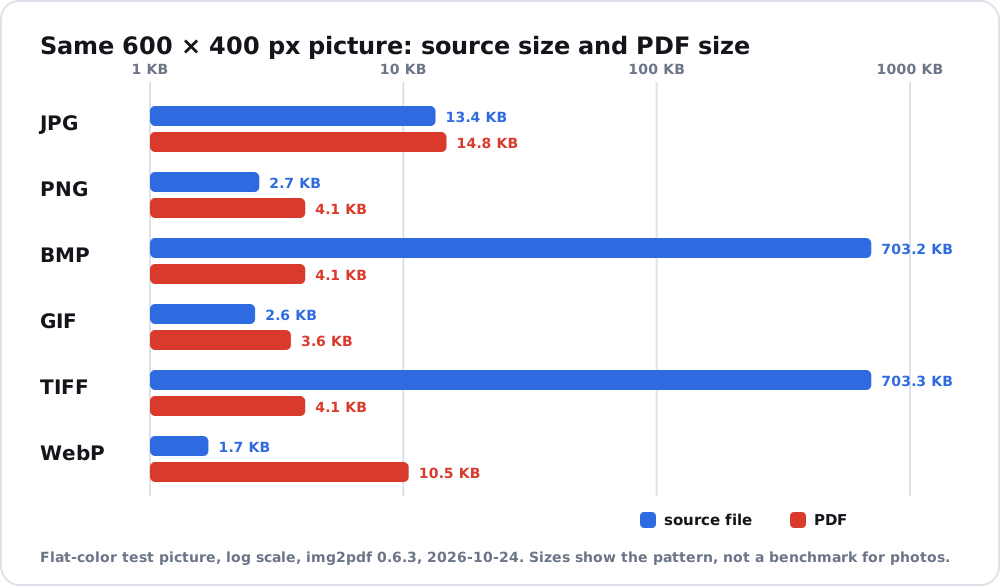
Image to PDF works for every common raster format, but the formats do not behave the same inside the PDF. JPG and PNG can be stored without changing their data, while BMP, GIF, TIFF and WebP are re-packed and sometimes change size a lot. HEIC needs a tool or system that can read it. The table below shows what happened in a test.
Image to PDF: how each format is handled
A test on 2026-10-24 generated the same 600 by 400 pixel picture in six formats and converted each with img2pdf 0.6.3. All six worked with img2pdf and with Pillow 13.0.0.
| Format | Source size | PDF size with img2pdf | Image data in the PDF |
|---|---|---|---|
| JPG | 13.4 KB | 14.8 KB | JPEG data (DCTDecode), embedded |
| PNG | 2.7 KB | 4.1 KB | Flate, the PNG’s own compression |
| BMP | 703.2 KB | 4.1 KB | Flate, re-compressed |
| GIF | 2.6 KB | 3.6 KB | Flate, re-compressed |
| TIFF | 703.3 KB | 4.1 KB | Flate, re-compressed |
| WebP | 1.7 KB | 10.5 KB | Flate, decoded and re-compressed |
The picture was a flat color with a border, so the absolute sizes are small and only the pattern matters. BMP and TIFF shrank because their raw pixels compress well, and WebP grew because the PDF stores decoded pixels, not WebP data. Animated GIF files and multi-page TIFF files were not tested. img2pdf’s own description names the formats it can embed without re-packing: JPEG, JPEG2000, non-interlaced PNG without transparency, CCITT Group 4 TIFF and single-page JBIG2.
HEIC and other formats in image to PDF tools
HEIC is not in the table because the test could not create it. It is the format iPhones use in High Efficiency mode, and Windows needs two Microsoft Store packages to open it, so a tool must read it before it can place it on a page. HEIC to PDF covers the routes by device. A PDF tool that lists a format has to decode it, so check the format list before you start. The PNG to PDF Chrome extension lists PNG, JPG and HEIC and processes files inside the extension on your computer; the site does not say what it does with other formats.
What to check after converting images to PDF
- The page count matches the number of images.
- Fine detail is sharp at 100% zoom.
- The file size fits the pattern in the table. A PNG or JPG that came out far larger or smaller than expected was probably processed.
Format-specific advice lives on the pages for PNG to PDF and JPG to PDF. To merge a mix of formats, read combine images into PDF. If you are choosing a tool, image to PDF converter free lists what to compare.
FAQ
Which image formats can I convert to PDF?
JPG, PNG, BMP, GIF, TIFF and WebP all converted in the test above. HEIC needs a tool that reads it.
Does the image quality change when I convert an image to PDF?
JPG and PNG can be embedded without changes. Other formats are decoded and stored again, which for lossless formats keeps the pixels but changes the packing.
Can I convert a WebP image to PDF?
Yes. In the test, img2pdf converted a WebP image. The PDF was larger than the WebP file because it stores decoded pixels.