
Guide · 3 min read
PNG to PDF: Every Method, What Changes and What to Check
By the PNG to PDF team ·
To turn a PNG into a PDF, place the image on a PDF page with a tool that keeps the pixels as they are: the print-to-PDF feature of your computer for one file, or a converter that accepts several files for a set. The method matters less than what the tool does to the image, and you can check that in two minutes.
What PNG to PDF changes in the file
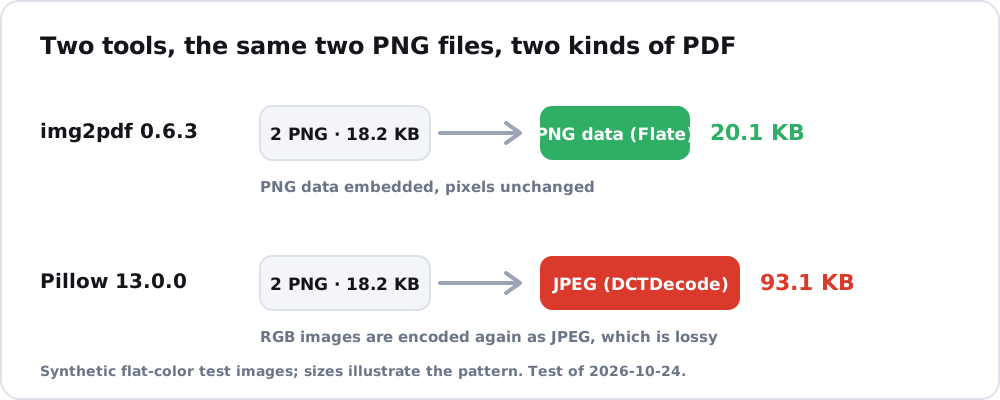
A PDF page holds your PNG as a picture, and the tool decides how that picture is stored. PNG is a lossless format: the W3C specification defines lossless as exact, bit-for-bit reconstruction. Some tools keep that, and some do not. In a test run on 2026-10-24, img2pdf 0.6.3 stored two PNG files in the PDF with the PNG’s own Flate compression, and the PDF was 20.1 KB for 18.2 KB of source files. Pillow 13.0.0 turned the same files into JPEG data inside the PDF, which is lossy.
Transparency is the second change. PNG can carry an alpha channel, and JPEG has none, per MDN, so a tool that converts the image to JPEG has to fill the transparent areas with a color. Make a picture to PDF covers logos and graphics in detail.
PNG to PDF methods compared
Each method suits a different job.
| Method | Best for | Watch for |
|---|---|---|
| Print to PDF in Chrome, Windows or macOS | One image | One page per file, with page margins |
| Word or Google Docs | A picture next to text | The document’s page layout applies |
| Chrome extension such as PNG to PDF | Several images in one session | Listed formats are PNG, JPG and HEIC; the site shows a choice between one PDF and a ZIP of separate files; files are processed inside the extension on your computer; the site publishes no limits on file count or size |
| Online converter | A quick one-off | The file goes to someone else’s server unless the page says it works in your browser |
| Command line or Python | Many files, repeatable jobs | Needs an install; see the free offline recipes in convert PNG to PDF free |
The click-by-click steps for Chrome, Word and Google Docs are in convert PNG to PDF. For a multi-page PDF from several PNGs, read combine images into PDF.
Check the PDF you get
Open the finished file and check four things.
- The page count equals the number of images.
- At 100% zoom, small text and thin lines look as sharp as in the PNG.
- A logo with a transparent background looks the way you expect, on white if that is what you want.
- The file size makes sense. A tool that embeds the PNG directly adds only a small container overhead; img2pdf documents about 500 to 700 bytes per image. A PDF far smaller or far larger than the PNG suggests the image was re-encoded.
JPG sources behave differently inside a PDF, and JPG to PDF explains how.
FAQ
Does converting PNG to PDF lose quality?
It depends on the tool. A tool that embeds the PNG data keeps every pixel, and one that re-encodes as JPEG does not. Compare the PDF with the PNG at 100% zoom.
Can I convert several PNG files into one PDF?
Yes. Use a converter that accepts several files and sets page order, or a command-line tool that takes a list of files. Print-to-PDF handles one image at a time.
Is there a free way to convert PNG to PDF?
Yes. Your computer’s print-to-PDF feature is free, and so are the command-line tools in the free-offline guide linked above.