
Guide · 3 min read
Scan Image to PDF: Resolution, OCR and File Size Tips
By the PNG to PDF team ·
To scan an image to PDF, scan at about 300 pixels per inch for documents, save the result as a PDF or an image, and add text recognition if you need to search or copy the text. A scan saved without it is a picture of a page: it looks right and has no text inside. The three choices that matter are resolution, text recognition and file size.
Scan image to PDF: resolution
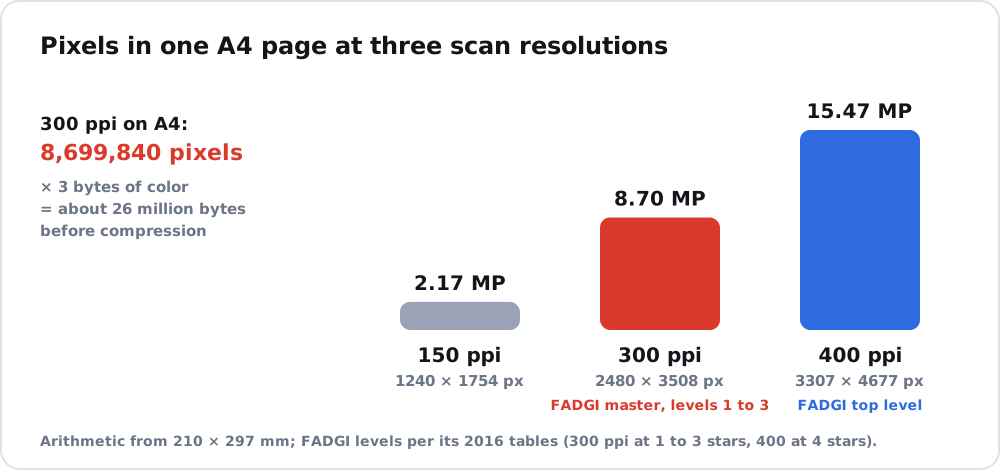
The Federal Agencies Digitization Guidelines Initiative (FADGI) sets 300 pixels per inch as the master resolution for documents at its lower and middle quality levels and 400 at its top level, per its 2016 tables. Those guidelines are for archives, so everyday needs are lower, but 300 is a sound default for text that someone will read or print. Higher resolution means more pixels and a larger file. An A4 page at 300 pixels per inch is about 2480 by 3508 pixels, which is roughly 26 million bytes uncompressed at 24-bit color before any compression.
OCR: image-only versus searchable
A scan stores pixels, not letters. Optical character recognition (OCR) reads the letters in those pixels. Google’s Drive help describes the idea for files you already have: you can convert a PDF or a photo file (.jpeg, .png or .gif) to a Google Doc, with limits. The file should be no larger than 2 MB, text should be at least 10 pixels tall, sharp and evenly lit images work best, pages must be upright, and tables, lists, columns and footnotes are often not recognized. Scanner software can also run OCR as part of saving: PDF-XChange’s help describes a Scan to PDF tool that pulls pages from a scanner, creates a PDF and can optionally run OCR.
If you only need to send or print the document, an image-only PDF is enough. If someone has to search it, copy from it or use a screen reader, add OCR and check the text.
Keep the scanned PDF small
Scan at the lowest resolution that keeps small text legible, crop the borders, and avoid color when the page is black and white. Each extra page multiplies the size, so for a long document check one page first. For many scanned pages as separate image files, convert photos to PDF covers one file versus many, and image to PDF shows how formats such as TIFF and BMP are packed into a PDF. A printed photograph needs different advice, which scan picture to PDF gives, and phone scanning apps are covered in picture to PDF app.
FAQ
What resolution should I scan to PDF?
About 300 pixels per inch is a sound default for documents. FADGI uses 300 to 400 for archival masters.
Is a scanned PDF searchable?
Not unless OCR was applied. Without it the PDF holds pictures of pages.
Why is my scanned PDF so big?
High resolution and color multiply the pixel count. Lower the resolution to the minimum that keeps small text legible, crop borders and scan black-and-white pages in black and white.