
Guide · 3 min read
JPG to PDF Converter Online: How It Works, What to Check
By the PNG to PDF team ·
A JPG to PDF converter online works in one of two ways: it sends your files to its server and returns a PDF, or it converts them inside your browser. Both look the same on screen. The difference decides who has a copy of your images, so check it before you use a site for anything private.
JPG to PDF converter online: the two models
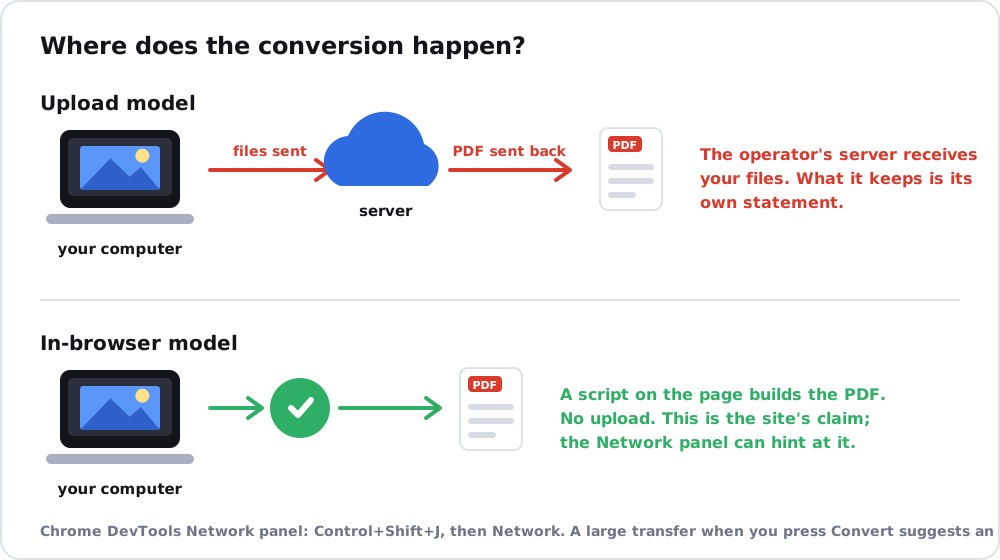
In the upload model, the page sends your JPG files to the operator’s server, which builds the PDF and sends it back. In the in-browser model, a script on the page does the work on your computer, and the files are not sent. Search results for online converters show both claims: one tool says it processes all files in your browser, and another says files are deleted automatically after a time. These are statements by the operators, and you cannot confirm a deletion promise from outside. A processing-location statement can sometimes be tested, as the next section shows.
Check whether a converter uploads your files
Chrome’s DevTools Network panel logs the requests a page makes. Chrome’s documentation says to open DevTools with Control+Shift+J (Windows, Linux) or Command+Option+J (Mac), click the Network tab and reload the page to populate the log, and that the Size column shows the amount of data transferred over the network. If you press Convert with a harmless test file open in that panel and see a large transfer, that suggests the file was sent. A page that sends nothing large is consistent with in-browser processing. This is a quick indication and not proof, because a page can compress or split requests.
Read the privacy policy for retention and sharing, check that the address begins with https, and note whether the site wants an account. Picture to PDF app covers the same checks for apps, and image to PDF converter free lists six checks that apply to any converter.
Use a local tool for private files
For identity documents, medical papers or contracts, skip the upload model. The built-in tools of Windows and Mac convert on the computer, and JPG to PDF free explains the strings attached to free web tools. A Chrome extension is a local option too: PNG to PDF converts files inside the extension on your computer, according to its maker, accepts JPG, PNG and HEIC, and publishes no limits on file count or size. If you can run Python, convert JPG to PDF tool has tested code.
FAQ
Are online JPG to PDF converters safe?
It depends on the operator. Check where files are processed, how long they are kept and whether an account is needed.
Do online converters keep my files?
Some say they delete them after a time. That is the operator’s statement, so avoid uploading private files to a site you do not trust.
How can I tell if a converter works offline in the browser?
Open the Network panel in Chrome DevTools, convert a test file and see whether a large transfer happens. It is an indication and not a guarantee.